 Intelligent Diary
A private video, voice, photo & text diary.

- 100% on-device Apple Intelligence
- Nothing sent anywhere, ever
- No subscription, no account, no ads
- The basics are free, capture, timeline, searching, sync, import, export
Questions? Feature Requests? Send me an email: support@intelligentdiary.app
Jump to a category
- 01CaptureVideo, audio, photo, text — and scanned handwriting
- 02Timeline & searchInstant text search · photo search by meaning
- 03Playback & detailTappable transcript · per-entry actions
- 04PodcastYour diary, read back to you · any entry, any set
- 05InsightsAt-a-glance summary · On This Day
- 06ChartsCharts + a 52-week activity strip
- 07WordsYour vocabulary, mapped by meaning
- 08LibrarySubjects · tags · faces · intentions · scenes
- 09Hallucination StationOn-device chat & generative art
- 10Your dataA real folder · import · export · sync
- 11Privacy & platformOn-device · app lock · nothing collected
Capture Free
Every kind of entry, started from anywhere.
Record in whatever form fits the moment — including the paper journals you already keep — then start it from the surface you're already touching. Capture begins in about a second.
- Video entries — front or back camera, your choice of resolution.
- Audio-only entries — press the action button and talk.
- Photo entries — capture with your device's camera or import from your photo roll.
- Text entries — supports markdown and optional draft mode.
- Handwritten pages — point the camera at a paper journal; on-device handwriting recognition turns each page into a searchable entry, reads dates off the page itself, and keeps multi-page entries together.
- On-device transcription — every recording becomes searchable, time-indexed text on the phone itself, using a speech model that ships inside the app. No audio is ever sent anywhere — not even to Apple.
- Audio moments — the sounds around your words (laughter, music, rain, a passing train) are detected on-device and pinned to the entry as tappable moments.
Quick capture, five ways
The diary opens from wherever you already are — and each trigger remembers which kind of entry you want from it.
Timeline & search Free
A whole life of entries you can actually find.
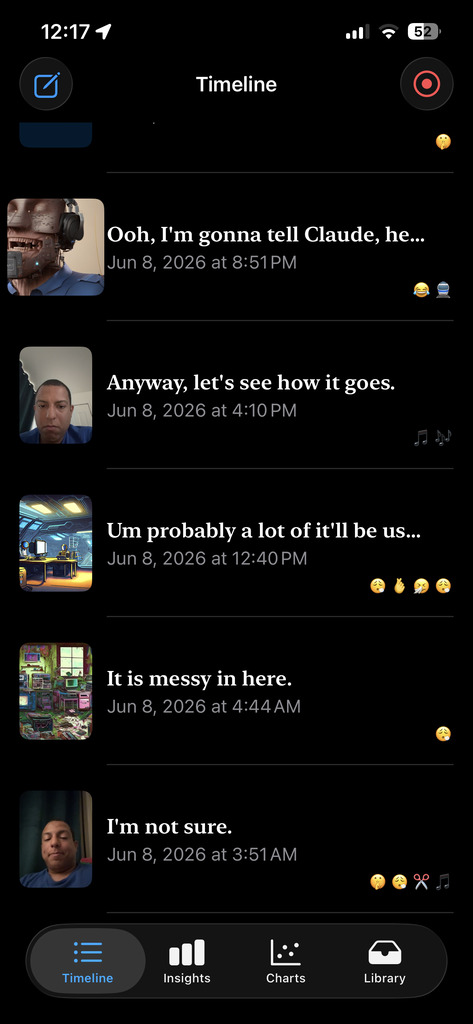
The home tab is a reverse-chronological feed with thumbnails and auto-written headlines — and two kinds of search over everything in it, both computed on your phone.
- Chronological feed with thumbnails, generated headlines, mood color, and audio-moment glyphs for fast scanning.
- Instant full-text search — every word of every transcript, headline and tag, matched as you type.
- Photo search by meaning — type "birthday cake in the garden" and photos that look like that surface in their own results section, matched by an on-device vision model.
- Filters bar to narrow the feed down to exactly what you're after.
- One tap, one rule — tapping an entry always opens the entry; a dedicated play button starts playback.
Playback & entry detail Free
Open an entry. Tap a sentence. The video jumps there.
Every entry has a clean full-screen player and a metadata-rich detail view. The transcript is a map of the recording, not just text beneath it.
In the player
- Full-screen player with scene pills and a caption overlay.
- Tappable, time-indexed transcript — tap a line, seek to that second.
- Subjects & feelings highlighted inline in the transcript text.
In the entry view
- Text · Actions · Info — the transcript rendered as Markdown, every action in one place, and the entry's full metadata.
- Chips for everything extracted — subjects, feelings, topics, objects and tags, each tappable.
Podcast Listen: Free Player: part of Words
Your diary, read back to you.
Every entry can be listened to — audio and video entries play their own sound, written entries are read aloud by a voice on your device. String them together and your diary becomes a podcast of your own life: a year, a month, a search, on shuffle.
- Listen on any entry — free. Text, photo and handwritten entries are read aloud; audio and video entries play as recorded.
- The Podcast player lives in Words: pick a year, a month, a search or the whole diary, put it on shuffle, and it plays entry after entry with an optional spoken interstitial between them. Speed control, chapter pills for multi-scene entries, a scrubber that snaps to sentences.
- Stations — save a set and it remembers where you stopped. Continue listening, your stations, all stations; they sync with the rest of your diary.
- A real audio app — plays in the background, on the Lock Screen and in Control Center, with play / pause / next / previous from your headphones and car.
- Voices stay on your device. Automatic picks the best installed voice for each entry's language; choose any premium or enhanced Apple voice, or your own Personal Voice. Nothing is synthesized in a cloud.
Insights Free
Your week, month or year — summarized from your own words.
Pick a range and Insights assembles one readable picture from your actual transcripts. A summary, never a score.
- Top subjects — who and what filled the range.
- Feelings mix and scene mix at a glance.
- Trajectory — the direction things are heading.
- Mood sparkline — the shape of the period.
- What feels good — the subjects and topics trending positive, each a tap away from its entries.
- AI summary paragraph, written on-device from your transcripts.
Charts $4 one-time unlock · 60-day free trial
Many ways to see your diary.
At the top of the Charts tab, a 52-week activity strip. Below it, an ever growing list of charts in three families. Every one is built on-device from your own entries. Try all of it free for 60 days; one $4 purchase keeps it forever.
Feelings
5 chartsPeople, places & things
8 chartsTime patterns
7 chartsWords $2 one-time unlock · 60-day free trial
Your vocabulary is a place. Walk around in it.
Words has its own tab. Every word you've ever used in your diary, made visible — mapped, painted, counted and questioned — plus the sentences your entries open with, the things you wish for and the things you regret. All of it computed on your phone from your own entries.
- Five charts — Words per Entry, New Words, and Cumulative Words: how much you say, what's fresh, and the total sweep of your vocabulary — plus Intentions and Keep Saying: every future-facing thing you've said, and the ones you keep repeating.
- Size and color the map your way — by usage, meaning, length or recency; by cluster, polarity or novelty.
- One map per diary — the layout is stable across time ranges, so a word's neighborhood stays put as you move between This Week and Everything.
- Opening Lines, Wishes and Regrets — three lists pulled straight from your sentences, each dated and tappable: how your entries begin, what you've wished for (needs, hopes, wants — filter by kind), and what you'd do differently. No advice attached.
- The Podcast player lives here too — see Podcast.
Library Free
Everything the app pulls from your entries, in one place.
Subjects, tags, faces, intentions, scenes and counts — the structured index of your diary, with the tools to keep it tidy.
Subjects
Every person, place and thing you've mentioned, each with its own sentiment and an optional picture. Sort and search, then merge wrongly-split subjects, split conflated ones, or rename them.
Faces
Faces from your photo and video entries, found and grouped entirely on-device. Name a group once and it becomes a subject — so "photos with Mom" is one tap, and her picture follows her through the app.
Settings
Conifgure the app to behave the way you prefer.
Tags
An A–Z of every tag on your entries — topics, objects, feelings and your own — filterable by kind.
Scenes
The discourse "chapters" pulled from longer entries — narration, reflection, planning, gratitude, questioning — each one tap-to-seek.
Counts & Processing
A plain tally of everything parsed and stored, and a Processing screen that shows exactly what the analysis is doing — including while it runs in the background.
Hallucination Station $4 one-time unlock · 60-day free trial
On-device chat and generative art, made from your diary.
Five fully on-device experiments that play with your entries. Nothing here leaves the phone.
Reverie and Feeling Frames run on an image model that ships inside the app — your entries are never sent to a server. A dream you love can be saved or become the entry's picture; the rest evaporate when you leave.
Your data Free
Your diary is a real folder of ordinary files.
Stored inside or outside of the app. Your choice. Choose outside the app for an open folder you can open in the Files app, and keep wherever you keep things.
- Several diaries — keep separate diaries and switch between them; opening an existing Intelligent Diary folder adopts it.
- Import — a Day One archive, an Apple Journal export, an Intelligent Diary backup, your Photos library, scanned handwriting, or plain files and folders (text, Markdown, photos, audio, video). Dates are read from the files themselves; everything lands in a review step before it commits, and re-imports recognize what's already in.
- Export — an Intelligent Diary bundle (your diary folder and database) or a Day One–compatible archive, media included without re-compression.
- A folder you control — recordings, photos and text entries live as ordinary files in a folder you choose. Add or edit files outside the app and a review screen reconciles the changes. Edit your diary with any other program. Obsidian, Vim, iA Writer, anything. Drop files in from anywhere. Re-arrange your files however you want. Back up with git. Use your own sync system. Intelligent Diary works with your diary. Open an existing folder for your diary if you want. Intelligent Diary will never change or delete files it did not make.
- Storage & Trash — see what's using space; recover from a 30-day Trash.
Sync
Two private ways to sync — peer-to-peer, iCloud, or both.
Keep your diary in step across your own devices — iPhone, iPad and Mac — your way. The default is our own peer-to-peer sync, running directly over your local Wi-Fi network: no cloud, no server, no account — your devices sync to each other, and your entries never pass through anyone's servers. Want always-on convenience too? Opt into iCloud sync as well. Use either, or both, per diary.
- Peer-to-peer, on your Wi-Fi — you approve each device with a short on-screen pairing code, so your diary only transfers to a device you say yes to.
- Encrypted in transit, and only the changes are sent — deletes included, so an entry you remove stays removed on every device.
- Opt-in iCloud sync — off by default; turn it on per diary for automatic sync through iCloud. Anything the app isn't sure about lands in a review screen instead of silently overwriting.
- Powerful devices can analyze for the rest — Use all of Intelligent Diary's features on old phones by syncing them to devices capable of running Apple Intelligence. Let your laptop do the heavy lifting and sync to your phone.
Privacy & platform Free
It runs on your phone. Nothing leaves it.
Transcription, analysis, search, charts, chat and images are all 100% on-device. No account, no server, no analytics, no training on your life.
100% on-device AI
Everything is computed locally — even in airplane mode. The speech, vision and image models install with the app from the App Store; nothing you create is sent anywhere, and your life is never used to train anything.
iCloud sync — opt-in, OFF by default
If you turn it on, it's end-to-end encrypted and syncs automatically.
Optional app lock
Turn on the lock in Settings and Face ID, Touch ID or your passcode guards the diary — so a borrowed or lost phone doesn't open your life.
App-switcher privacy mask
Your content is hidden behind a mask in the app switcher — lock on or off, no over-the-shoulder leaks.
Even place names stay local
Entry locations become city names via a world-cities database bundled inside the app — your coordinates are never sent to a geocoding service.
Works while you sleep
Big analyses keep going in the background and finish overnight while the phone charges — with a live card showing honest progress.
Privacy Policy
Effective August 7, 2026 — Intelligent Diary does not collect, store, or transmit your personal data. Everything you put into the app — video, audio, photos, and text — and everything the app computes from it (transcripts, analysis, search indexes, charts, generated images) is created and stored only on your device. The app requires no account, contains no analytics, advertising, or tracking code, and never sends your content, usage data, or identifiers to us or to anyone else. Camera, microphone, photo-library, speech-recognition, and location permissions are used solely to create and enrich entries on your device. If you enable the optional iCloud sync (off by default), your diary syncs through your personal iCloud account via Apple's private CloudKit database; only your own devices can access it, we cannot, and Apple's iCloud terms and privacy policy govern that storage. Purchases are processed entirely by Apple, and we receive no personal information from them. Because we hold no data about you, there is nothing for us to share, sell, or delete: deleting the app removes your data from your device, and if you used sync you can remove the app's iCloud data in iOS Settings. If this policy changes, the updated version will be posted at this address. Questions: support@intelligentdiary.app.
The whole idea
Your words, not our advice.
Every feature on this page does one thing: it surfaces your own patterns from your own words, and then it stops. It never concludes for you.
Honest comparison
How it stacks up — including where it doesn't.
No app wins every row. Here's where Intelligent Diary is genuinely different, and where another app may simply fit you better. Competitor details are from public 2026 sources and change often — worth re-checking before you decide.
| Feature | Intelligent Diary | Day One | Apple Journal | Rosebud | Journey | Daylio | Reflectly | Stoic |
|---|---|---|---|---|---|---|---|---|
| Price | Free diary · one-time in-app purchases for new Ai powered features · no subscription | Free · Silver $50/yr · Gold $75/yr | Free | Free · $13/mo | Free · subscription | Free · $5/mo | Free · $10/mo | Free · $7/mo |
| Platforms | iPhone, iPad, Mac | iPhone, iPad, Mac, Android, Web, Watch | iPhone, iPad, Mac | iOS, Android, Web | iOS, Android, Mac, Windows, Web | iOS, Android | iOS, Android, Mac, Web | iOS, Android, Mac, Web, Watch |
| AI runs on your device | Yes — 100% on-device | No — cloud (Gold tier) | Yes — on-device | No — cloud | No — cloud (GPT) | Minimal | No — cloud | No — cloud |
| Works with no account | Yes | Account for sync | Yes (iCloud) | Account required | Account / Google | Yes | Account required | Account required |
| Records & analyzes video + audio | Yes | Media attachments (paid) | Audio + attachments | Text + voice | Media attachments | No — mood + tags | Text + mood | Voice + attachments |
| On-device transcription | Yes | Premium | Yes (audio) | No | No | No | No | — |
| Listen to your diary (podcast) | Yes — any entry read aloud, free; a podcast player over any set of entries, with stations and on-device voices | Plays back audio you recorded — no read-aloud | Plays back audio you recorded — no read-aloud | Voice journaling in — no read-aloud | Plays audio attachments — no read-aloud | Voice notes (PRO) play back — no read-aloud | No — audio affirmations only, not your entries | No — meditation audio, not your entries |
| Search | Text, semantic & image-content — all on-device | Text search + filters (tags, dates, places) | Text search + date/category filters | Text search + AI recall | Phrase/tag/sentiment — Journey Cloud entries only | Notes search + filters | Browse only — no search documented | Basic text search |
| Sync | Local peer-to-peer, iCloud | Day One's cloud (end-to-end encrypted) — one device free, all devices paid | iCloud (end-to-end encrypted) | Their cloud — account required | Journey Cloud or your Google Drive | No true sync — manual backup / restore via iCloud or Google Drive | Their cloud — subscription | iCloud — Apple devices only; no iOS ↔ Android sync |
| Deep analytics (subjects, patterns, charts) | Yes | Limited | No | AI summaries, not charts | Basic stats + AI Q&A | Mood & activity stats | Mood graphs | Mood + AI patterns |
| What the AI does | Reflects your own words — no advice | Prompts & summaries | Suggestions from your day | Coaches & advises you | Conversational AI about your entries | Mood stats (AI in beta) | Guided prompts (CBT) | AI mentors / coaching |
| Generative art from your entries | Yes — on-device | AI images (Gold, cloud) | No | No | No | No | No | No |
| Scans handwritten journals | Yes — on-device OCR | No | No | No | No | No | No | No |
| "On This Day" resurfacing | Yes | Yes | Limited | — | Yes | — | — | — |
| Import from other apps | Apple Journal, Day One, text/markdown, photos, video, audio. Or edit your diary in place with any other app. | Apple Journal, plain text; Journey & Diaro on Android only | No bulk import — share sheet, one entry at a time | None documented | Day One, Evernote, Diaro, Daylio | Own backups only — CSV export is one-way | None documented | Day One backups + its own |
| Full export, no lock-in | Yes — your diary is already ordinary files; bundle + Day One export | Yes | Minimal | Limited | Yes | CSV / PDF (premium) | PDF only | In development |
Competitor pricing & features from public sources (Jun 2026), and they change often: Day One plans · Apple Journal · Rosebud pricing · Journey membership · Daylio · Reflectly · Stoic premium · Reflection roundup.
Where another app may fit you better
- You need Android or the web today. Intelligent Diary runs on iPhone, iPad and Mac (built for iPhone for now — bigger-screen iPad and Mac layouts are on the way), but not Android or the web. Day One, Journey, Rosebud and Stoic are everywhere.
- You want to be coached. We deliberately don't give advice, set goals, or hand you action plans. If you want an AI that tells you what to do, Rosebud, Reflectly or Stoic are built for exactly that.
- You want quick, tap-to-log mood tracking, not a written or recorded diary. Daylio does that beautifully, for very little.
- You want printed books, Strava / Zapier integrations, or a decade of polish. That's Day One.
- You just want a simple, free, built-in journal. Apple Journal is free and also private — a genuinely good choice.
Intelligent Diary is for one person: someone who wants a private, multimedia diary whose AI runs entirely on their phone, turns into insight they own outright, and never tells them what to do — free to start, $10 to own everything.
Pricing
The basics are free. No subscriptions. No accounts.
- Capture. Text, Audio, Video, and Photos.
- Timeline.Browse all of your entries.
- Search. Text match, semantic, and image content search.
- Insights.A high level view of a week, month, or year of your diary.
- Listen. Any entry read aloud, right from the entry.
- Faces. Add images of the people you talk about to see their face around the app.
- No Lock in. Store your diary in a normal folder of normal files that you can edit with other tools.
- Import. Apple Journal, DayOne, text, markdown, images, videos, audio, and Intelligent Diary's own exports.
- Export. Apple Journal, DayOne, Intelligent Diary(a normal folder of normal files).
- Sync. Supports local, private, peer-to-peer syncing between two of your nearbye devices. And iCloud syncing
- Charts — $4, once. The activity strip and all of the charts.
- Hallucination Station — $4, once. Diary Chat, Reverie, Feeling Frames, Mood Art.
- Words — $2, once. Word Map, Word Pictures, Word Insights, Questions, Opening Lines, Wishes, Regrets, the Podcast player, the Intentions charts, and the word charts.
- Every unlock has its own 60-day free trial — the clock starts the first time you open that feature, never before. Try it on two months of your real diary, then decide.
- Purchases restore on any device signed into your Apple Account. Analysis never stops for unpaid features — your data is always fully processed, so unlocking later shows you everything retroactively.
Intelligent Diary
Contact
support@intelligentdiary.app